Every week our editors open submissions where the photograph is lovely and the file is 1080 pixels wide. Somewhere between the camera and the upload button, a full-size original turned into an Instagram copy, and a magazine page can't print that. Here is what "300 dpi" actually asks of you, with exact pixel numbers for every common placement and a one-minute check before you send.
DPI, PPI and the number that actually matters
Two terms get mixed up constantly:
- PPI (pixels per inch) describes your image file: how many of its pixels will be packed into each inch of paper.
- DPI (dots per inch) describes a printer: how many ink dots it lays down per inch.
Magazines say "300 dpi" out of habit, and everyone understands it as 300 pixels per inch at the printed size. That last part is the whole secret. A resolution number means nothing without a size attached to it.
The "DPI" field inside your JPG is just a note in the file's metadata. A photo of 2550 × 3300 pixels prints at 8.5 × 11 inches at 300 ppi whether its metadata says 72, 300 or 1200. A 1080 × 1350 web copy stays a web copy even if you type "300" into that field: as Adobe's Photoshop documentation explains, resizing without resampling adds no pixels.
So the question an editor really asks is simple: does this file have enough pixels for the size we want to print it at?
Pixels needed = print size in inches × 300.
If you think in millimetres, convert first: pixels needed = (size in mm ÷ 25.4) × 300.
Two quick examples:
- A full page 8.5 inches wide: 8.5 × 300 = 2550 px.
- An A4 page 210 mm wide: 210 ÷ 25.4 = 8.27 in, × 300 = 2480 px.
Why 300 in particular? Offset magazines are traditionally printed with a halftone screen of about 133 to 150 lines per inch, and the long-standing prepress rule is to supply 1.5 to 2 times that figure in pixels per inch. Two times 150 is 300. Below that range the screen asks for more detail than the file can deliver, and the result looks soft or blocky.
Pixel sizes for magazine placements at 300 ppi
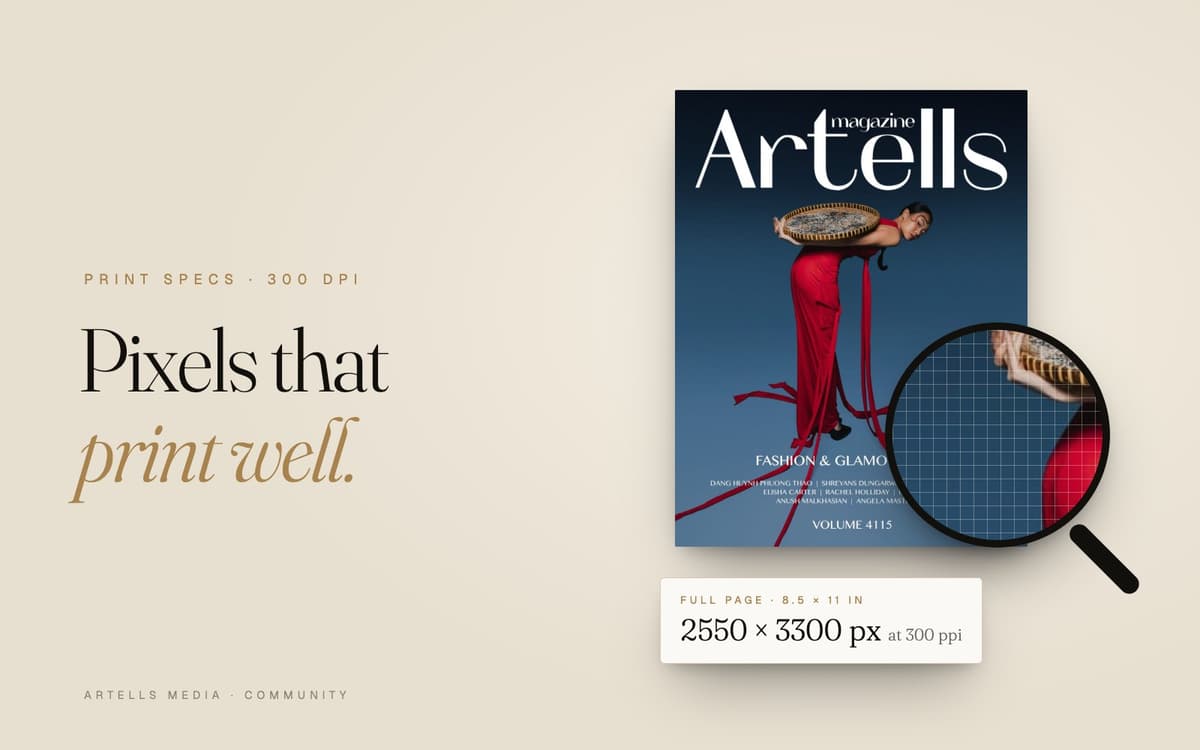
Our magazines use a page of 8.5 × 11 inches, and the submission rules list two sizes: portrait 2550 × 3300 px and landscape 5100 × 3300 px. Here is how that maps to common placements.
| Placement |
Print size (in) |
Print size (mm) |
Pixels at 300 ppi |
Megapixels |
| Full page, portrait |
8.5 × 11 |
215.9 × 279.4 |
2550 × 3300 |
8.4 |
| Cover |
8.5 × 11 |
215.9 × 279.4 |
2550 × 3300 |
8.4 |
| Double spread |
17 × 11 |
431.8 × 279.4 |
5100 × 3300 |
16.8 |
| Half page, vertical |
4.25 × 11 |
108 × 279.4 |
1275 × 3300 |
4.2 |
| Half page, horizontal |
8.5 × 5.5 |
215.9 × 139.7 |
2550 × 1650 |
4.2 |
| Quarter page |
4.25 × 5.5 |
108 × 139.7 |
1275 × 1650 |
2.1 |
If you also submit to European titles, A4 is the size you'll meet most often (rounded to the nearest pixel):
| Placement |
Print size (mm) |
Pixels at 300 ppi |
| A4 full page |
210 × 297 |
2480 × 3508 |
| A4 double spread |
420 × 297 |
4961 × 3508 |
| A5 (half of A4) |
148 × 210 |
1748 × 2480 |
A note on bleed. Pages that run to the edge are printed slightly larger and then trimmed, usually by about 3 mm (0.125 in) on each side. A full 8.5 × 11 page with that bleed becomes 8.75 × 11.25 in, or 2625 × 3375 px. You don't need to add bleed yourself: the editors handle it in layout. Just expect the print trim to take a little off the edges (the rules also let the magazine crop and resize your photos for publication), and keep important details (fingertips, the edge of a hat brim, a signature) a little away from the frame's edges.
Good news for your camera
A 24-megapixel camera produces 6000 × 4000 px. Cropped to the shape of our double spread, that is still 6000 × 3882 px, comfortably above 5100 × 3300. A vertical cropped to page proportions gives about 4000 × 5176 px. Almost any modern camera has enough pixels for a full page; files lose them later, in export settings and messengers.
Mind the shapes too. A spread (17 × 11) is close to the 3:2 frame most cameras shoot. A single page (8.5 × 11) is wider than a 2:3 vertical, so a vertical frame loses a little at the top or bottom.
Where the 2200 px floor comes from
The submission form accepts files from 2200 px on the long side and marks anything smaller with a red "Too small" label. At 300 ppi, 2200 px prints at 7.3 inches (about 18.6 cm); stretched over the full 11-inch height of a page, it gives 200 ppi. Treat it as a floor. The full 2550 × 3300 or 5100 × 3300 gives the layout designer room to crop and place your frame where it works best.
Colour: sRGB, Adobe RGB, CMYK
Our rules ask for JPG files in the sRGB colour profile. Here's what that means in practice.
- sRGB is the standard colour space of the web and of most screens. It is the safest choice to send because every program reads it the same way.
- Adobe RGB is wider: it holds more saturated greens and cyans. Many photographers edit in it, which is fine. Before export, convert the file to sRGB (in Photoshop: Edit > Convert to Profile). Use Convert, which recalculates the colours. Assign Profile only relabels them, and the image shifts.
- CMYK is the four-ink language of the printing press. Don't convert to it yourself: the conversion depends on the paper, the press and the printer's profile, and that work belongs to prepress.
Two habits that prevent surprises: embed the colour profile when you export (some online converters strip it), and edit on a calibrated screen at moderate brightness. A monitor at full brightness flatters every edit, and the print comes out darker than you expected.
- Format: JPG, as the rules require. 8-bit is perfect for delivery, even if you edited in 16-bit.
- Quality: export at maximum or near maximum: 10 to 12 in Photoshop, 90 to 100 in Lightroom. Lower settings add blocky artifacts in skies, shadows and smooth skin, and print makes them more visible.
- Size limit: each file can be up to 40 MB, which is plenty for a high-quality JPG at our sizes.
- Export once, from the source. Every re-save of a JPG compresses it again, so export a fresh one from your RAW or master file. Never send a file that went through WhatsApp, Telegram or a social network: they quietly shrink everything.
The upscaling myths
Myth 1: changing 72 dpi to 300 dpi makes a photo print-ready. It only changes the metadata. The pixels stay the same, so the print size shrinks to match. A 1080 px wide image at "300 dpi" is 3.6 inches wide.
Myth 2: any photo can be enlarged to any size in Photoshop. Classic resampling (bicubic and similar) invents in-between pixels by averaging their neighbours. A modest enlargement of a clean, sharp file can print well. Doubling a web copy gives you a big blurry file, and editors see it immediately at 100% zoom.
The honest fix is always the same: go back to the original file.
How to check your file in one minute
- Pixel dimensions. On a Mac, open the file in Preview and press Cmd+I (Tools > Show Inspector): you'll see the image size in pixels and the colour profile. On Windows, right-click the file, choose Properties > Details. In Photoshop, Image > Image Size.
- Print size at 300. In Photoshop's Image Size, untick Resample, type 300 in Resolution and read the width and height in inches. That's the largest size the file prints at 300 ppi.
- Colour profile. It should say sRGB (often "sRGB IEC61966-2.1").
- 100% zoom. Look at eyes, hair, skin, fabric texture and the darkest shadows. Prepress looks at your files exactly like this.
Common technical reasons for a decline
Editors judge the series first, but technical problems can sink a strong story. The ones we see most often:
- Web copies exported for Instagram or downloaded from a gallery site.
- Heavy compression: blocky skies, banding in gradients, mushy shadows.
- Unfinished retouching. The rules ask that all images be retouched, edited and of high quality. Dust spots and stray hairs on a printed page look ten times bigger than on a phone.
- Over-processing: plastic skin, sharpening halos around edges, crushed blacks with no detail.
- Wrong colour handling: an Adobe RGB file without an embedded profile, which looks flat and dull everywhere else, or a file already converted to CMYK.
- Screenshots and collages in place of single frames.
If something is borderline, the editors may write to you in the series chat and ask for full-size originals. Keep your masters until the issue is out.
Frequently asked questions
Is 300 dpi required for magazine printing?
For photos, yes in practice: magazines print at around 300 pixels per inch at the final size. What matters is the pixel count. For a full 8.5 × 11 inch page you need 2550 × 3300 px, and for a double spread 5100 × 3300 px. The DPI value written in the file's metadata changes nothing by itself.
How do I convert 72 dpi to 300 dpi?
In Photoshop, open Image > Image Size, untick Resample and type 300. The pixels stay the same and the print size shrinks to match. If the new print size is too small for the page, you need the original file with more pixels. Raising the number without enough pixels doesn't improve the print.
What resolution should photos be for a magazine cover?
A cover is printed at the size of a full page, so the same numbers apply. On our 8.5 × 11 inch page that means 2550 × 3300 px at 300 ppi. Keep important details a little away from the edges, because covers are trimmed and carry the title and cover lines.
Should I send photos to a magazine in CMYK or RGB?
Send what the magazine asks for. Our five magazines ask for JPG files in sRGB, and the conversion to CMYK is done in prepress for the specific paper and press. Converting to CMYK at home with a generic profile can dull your colours, and you lose control over the result.
Can I upscale a small photo for print?
A small enlargement of a sharp, clean file usually prints fine. Doubling or tripling a web copy doesn't: the enlargement only blurs it. Go back to the camera original or the RAW. Our form flags files under 2200 px on the long side as too small.
Ready when your files are
The technical side takes ten minutes once you know the numbers, and then the conversation can be about the work itself. Check the editors' advice on getting published, pick the title that suits your series among our five magazines, and send it in. If it's accepted, the reward is a printed page and official tear sheets for your book. And if you have one frame you love, try it for a cover in the monthly Awards.


Comments
Sign in to join the conversation.
No comments yet. Be the first.